
Beauty Tools & Accessories
How to Unlock a Samsung Washer: 6 Easy Solutions
May
A Samsung washer that refuses to unlock can turn a normal laundry day into a tiny domestic thriller. Your towels are trapped. Your socks are held hostage. The door just sits there, smugly locked, as if it has secrets. Fortunately, most Samsung washer lock problems are not dramatic failures. They are usually safety features doing their job, a Child Lock setting you forgot was on, water still sitting in the drum, or a drain filter that has collected enough lint, coins, and mystery fuzz to start its own civilization.
This guide explains how to unlock a Samsung washer safely, using six practical solutions that work for many front-load and top-load models. The key word is safely. Do not yank the door, pry the latch, or try to “outsmart” the machine with tools. A washer door lock is designed to prevent flooding, injury, and mid-cycle chaos. Instead, follow the steps below in order, starting with the simplest fix and moving toward drainage and service checks only if needed.
Because Samsung washer models vary, always check the control panel labels and your exact model manual. Some machines use different button combinations for Child Lock, some have an emergency drain hose, and some older models may not include a front-access pump filter. Still, the logic is usually the same: confirm the cycle is finished, make sure Child Lock is off, drain any remaining water, reset the electronics if appropriate, and call for service if the lock still will not release.
Why Your Samsung Washer Door Stays Locked
A locked Samsung washing machine is usually not “broken” in the way people fear. It is often protecting your floor from a surprise indoor pond. Front-load washers lock when water is detected inside because opening the door with water in the drum can create a messy flood. The washer may also stay locked if it is spinning, tumbling, too hot, paused after filling, or waiting for the lock mechanism to disengage after the cycle ends.
Child Lock is another common cause. On many Samsung front-load washers, Child Lock disables most buttons and may also lock the door. That is great when curious kids are nearby, but less great when you are standing in front of the machine holding a laundry basket and questioning your life choices.
Other possible causes include a clogged drain pump filter, a kinked drain hose, an unbalanced load that interrupted the cycle, a temporary control board glitch, or a faulty door latch. Start with the easy checks first. In many cases, your washer only needs a minute, a drain cycle, or the correct button combination.
Before You Start: Quick Safety Rules
Before trying to unlock a Samsung washer, slow down for a moment. If the drum is full of water, do not force the door. If the glass feels hot, wait until the water cools. If you smell burning, see sparks, or notice leaking near electrical parts, stop using the washer and arrange professional service. Laundry is important, but not “turn the laundry room into a science experiment” important.
Also, keep towels and a shallow pan nearby if you plan to drain a front-load washer. Water trapped behind the filter can come out faster than expected, especially if you unscrew the filter before using the small emergency drain hose. Think of the towel as your laundry room’s tiny insurance policy.
Solution 1: Wait for the Cycle and Door Lock to Finish
The easiest fix is also the most overlooked: wait. Samsung washers do not always unlock the instant the timer hits zero. The machine may need a few moments to stop tumbling, finish draining, and release the lock. Listen for a click. That sound usually means the lock has disengaged.
How to do it
Check the display first. If the cycle is still running, allow it to complete. If you need to cancel, press Start/Pause or Start/Pause (Hold to Start), depending on your model. After pausing or canceling, give the machine time to stop moving and drain. On some models, if the washer was paused after water entered the drum, the door may not open for about a minute.
For top-load Samsung washers that lost power during a cycle, the lid may take several minutes to unlock after power returns. This delay is part of the machine’s safety design. Do not wrestle with the lid. A washer lid is not a pickle jar.
When this solution works best
This is the right first step when the washer just finished a cycle, the door lock light is still on, the machine recently paused, or the unit lost power briefly. If the washer unlocks after a few minutes, there is likely no problem at all.
Solution 2: Turn Off Child Lock
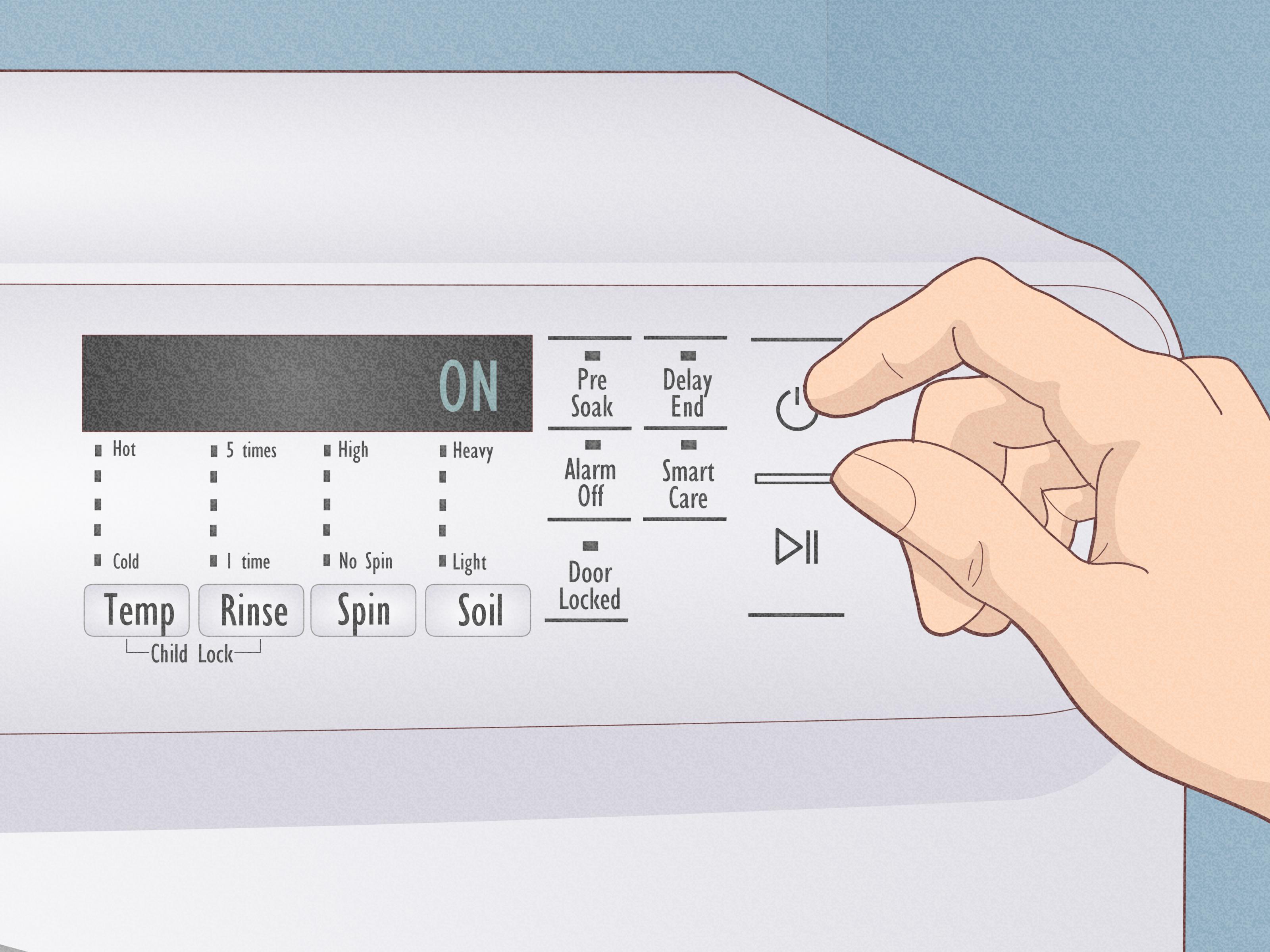
If your Samsung washer shows a lock icon, a baby icon, or a flashing CL message, Child Lock may be active. Child Lock prevents accidental button presses and, on many front-load models, can keep the door locked even if you restart the washer.
How to turn off Child Lock
Look closely at the control panel. Samsung usually marks the Child Lock button combination with a small lock symbol or lines connecting two buttons. Common combinations may include buttons such as Temp and Rinse, Rinse and Spin, or another pair depending on the model. Press and hold the two marked buttons at the same time until you hear a chime or see the Child Lock icon turn off.
Some Samsung models with a temporary Child Lock off setting require two steps: press and hold the button combination once until the icon flashes, then press and hold it again until the icon disappears. If nothing changes, check the user manual for your exact model. Guessing wildly at buttons can turn laundry into a very boring video game.
Important detail
Restarting the washer may not disable Child Lock. If Child Lock is the cause, a power cycle alone may not help. You need to turn the feature off using the correct button combination.
Solution 3: Run a Drain & Spin or Rinse & Spin Cycle
If water remains inside the drum, many Samsung front-load washers will keep the door locked. This is not the washer being stubborn. It is trying to stop water from pouring onto your floor. When the machine detects water, the safest next move is to drain it.
How to do it
Turn the washer on and choose a cycle such as Drain & Spin, Spin Only, or Rinse & Spin, depending on the options available on your model. Press Start and let the washer attempt to remove the water. When the cycle completes, wait for the lock light to turn off and listen for the unlock click.
If the washer drains properly and unlocks, the problem may have been a paused cycle or an interrupted drain. If it hums, struggles, stops with wet clothes, or shows a drain-related error, move to the next solutions.
Check for obvious drain problems
Look behind the washer if it is safe and easy to do so. A kinked, crushed, or improperly positioned drain hose can prevent water from leaving the machine. Do not drag a heavy washer aggressively, especially if it is full of water. If the machine cannot be moved safely, get help or call a technician.
Solution 4: Power Cycle the Washer
A power cycle is the closest thing to a simple Samsung washer reset. It can clear a temporary electronic glitch, but it should not be used as a magic eraser for real mechanical or drainage problems. If an error keeps coming back, the washer is trying to tell you something.
How to power cycle safely
Turn the washer off. Unplug it from the wall outlet or turn off power at the circuit breaker. Wait about one to five minutes so the electrical charge can clear. Restore power, turn the washer on, and wait for the door to unlock. You may hear the door latch click.
If the washer unlocks and no error returns, the issue may have been temporary. If the washer immediately locks again, refuses to drain, or displays the same code, continue troubleshooting. Repeatedly resetting the machine without fixing the cause can make diagnosis harder later.
When to use this solution
Try a power cycle when the display is frozen, the buttons are unresponsive, the washer stopped mid-cycle after a power interruption, or the door remains locked even though the drum appears empty and the cycle is complete. Avoid using it as the first move if the drum is visibly full of water; drain the water first.
Solution 5: Emergency Drain the Washer and Clean the Pump Filter
For many Samsung front-load washers, the real villain is a clogged pump filter. Lint, hair, coins, buttons, hairpins, pet fur, and the occasional tiny sock can block drainage. When the washer cannot drain, it may keep the door locked. Cleaning the filter can solve both the locked-door issue and future problems like wet clothes, slow cycles, odd noises, or poor spinning.
How to emergency drain a Samsung front-load washer
First, turn off and unplug the washer. Locate the small access door near the bottom front of the machine. Place towels on the floor and set a shallow pan or dish under the opening. Open the access panel. Pull out the emergency drain hose if your model has one, position it over the pan, remove the cap, and let the water drain slowly. Replace the cap whenever you need to empty the pan, then continue until water stops flowing.
Once the emergency hose stops draining, reinstall the cap securely. Then turn the pump filter counterclockwise to remove it. Be ready for extra water. Clean debris from the filter, rinse it with warm water, wipe inside the filter housing with a damp cloth, and reinstall the filter by turning it clockwise until secure. Close the access panel, restore power, and turn the washer on. The door should unlock if trapped water was the cause.
What if your washer has no emergency drain hose?
Some older Samsung front-load models may not have an emergency drain hose or easily accessible pump filter. Some top-load models also do not use the same emergency-drain design. If your machine does not match these steps, do not start removing random panels. Check the manual or schedule service.
Solution 6: Check the Door Area and Know When to Request Service
If the washer is drained, Child Lock is off, the cycle is complete, and the machine still will not unlock, inspect the door area. Sometimes the issue is not water or settings but the latch, striker, gasket, or something trapped near the door.
What to inspect
Look for clothing caught between the door and gasket. A small item jammed in the door area can confuse the latch or prevent proper sealing. Check whether the rubber gasket is folded, dirty, or blocking the latch. Wipe away detergent residue or lint around the door frame. If the door handle feels loose, the latch does not click, or the washer displays a door-related code repeatedly, the lock assembly may need repair.
Do not pry open the door with a screwdriver or force the handle. That can break the latch, damage the door, crack plastic trim, or create a leak. A forced door can turn a manageable service call into a more expensive repair. Very heroic, very unnecessary.
When to call Samsung service or an appliance technician
Request service if the door remains locked after emergency draining, the washer will not power on, water will not drain, the lock clicks repeatedly, the door error keeps returning, or the latch appears damaged. Also call for help if the washer is stacked, built into cabinetry, too heavy to move safely, or leaking near electrical components.
Samsung Washer Unlock Troubleshooting Checklist
Use this quick checklist when you are standing in front of the washer and want a clean order of operations:
- Confirm the cycle has ended and the drum has stopped moving.
- Wait for the door lock light to turn off and listen for the click.
- Check whether Child Lock is active and turn it off using the labeled buttons.
- Run Drain & Spin if water remains in the drum.
- Power cycle the washer for one to five minutes if controls seem frozen.
- Emergency drain a front-load washer and clean the pump filter if it will not drain.
- Inspect the door gasket, latch area, and trapped clothing.
- Request service if the door still will not unlock after safe troubleshooting.
Common Samsung Washer Lock Messages and Clues
CL or Child Lock icon
This usually points to Child Lock. Turn it off using the button combination shown on your washer panel or in the manual.
Door lock light stays on
The washer may still be draining, cooling, spinning, or sensing water. Wait briefly, then check for water in the drum.
Washer stopped full of water
Run Drain & Spin. If that fails, check the drain hose and use the emergency drain hose on front-load models that include one.
Door error or repeated locking clicks
This may indicate a latch, switch, control, or alignment issue. If draining and resetting do not fix it, professional service is the safer choice.
How to Prevent a Samsung Washer from Getting Stuck Locked Again
Prevention is easier than rescuing damp laundry from a locked machine at 10 p.m. Start by checking pockets before every load. Coins, clips, screws, and hairpins can end up in the pump filter and cause drainage problems. Use mesh laundry bags for tiny items like baby socks or washable pads. Avoid overloading the drum, because heavy, unbalanced loads can interrupt spinning and draining.
Clean the pump filter regularly if your model has one. A monthly check is smart for busy households, pet owners, and anyone who washes lint-heavy items. After cleaning the filter, make sure it is reinstalled tightly to prevent leaks.
Use the right amount of high-efficiency detergent. Too much detergent can create excess suds, which may interfere with rinsing, draining, and sensing. More soap does not equal cleaner clothes; sometimes it just equals a washer that looks like it joined a foam party.
Finally, leave the washer door slightly open after laundry is done, especially on front-load models. This helps the drum and rubber gasket dry, reducing odor and residue buildup. Wipe the gasket and dispenser area if they stay wet. A cleaner washer drains better, smells better, and is less likely to develop annoying performance issues.
Real-Life Experience: What Usually Works When a Samsung Washer Will Not Unlock
In real laundry-room life, the most common Samsung washer unlocking problem is not a dramatic broken latch. It is impatience mixed with a safety lock. The cycle ends, someone grabs the handle immediately, and the door says, “Absolutely not.” Waiting two or three minutes solves more cases than people expect. The washer may still be checking water level, finishing a tiny drain step, or releasing the lock mechanism. When you hear the click, the drama is over.
The second most common experience is Child Lock confusion. Many people activate it once, forget about it, and then assume the washer has failed because the controls will not respond normally. The clue is usually a lock icon, baby icon, or CL message. The tricky part is that the correct buttons vary by model. On one Samsung washer, the combination might be marked clearly under two buttons. On another, it may be hidden in small print that looks like it was designed for ants with excellent vision. Once the right combination is held long enough, the washer often returns to normal immediately.
The third real-world pattern is water that will not drain. This is where the front access panel becomes important. People often discover the pump filter only after the washer locks with wet clothes inside. When they open the little panel, drain the emergency hose, and remove the filter, they may find lint, coins, hair, fabric threads, and sometimes objects nobody wants to admit were in a pocket. After cleaning the filter, the washer drains properly and the door unlocks. It feels like a repair victory, even though the tool list was mostly towels and patience.
Another useful lesson: do not skip the shallow pan. The emergency drain hose is small, but the water can keep coming. A low tray, towels, and a slow approach prevent a laundry-room puddle. If you remove the large filter cap before draining through the hose, you may get a surprise splash. That is memorable, but not in a good way.
Power cycling is also helpful, but only after the obvious causes are handled. If the washer is empty, cool, and finished, yet the lock stays engaged or the display acts frozen, unplugging the washer for a few minutes can clear a temporary control issue. However, if the washer is full of water or showing the same error repeatedly, resetting does not fix the underlying problem. It only pauses the complaint. The washer will complain again, because appliances are honest like that.
The biggest experience-based warning is simple: never force the door. A stuck Samsung washer door is frustrating, but forcing it can damage the latch, bend parts, crack trim, or create leaks. If Child Lock is off, the water is drained, the machine has been power cycled, and the latch still will not release, the smart move is service. At that point, the problem may be the lock assembly, door switch, wiring, or control board. A technician can open and diagnose it without turning your washer into a parts donation box.
The best long-term habit is routine maintenance. Clean the filter, check pockets, avoid overloading, use the right detergent amount, and leave the door cracked open after use. These tiny habits prevent many “my washer is locked” emergencies before they start. Your future self, standing in dry socks on a dry laundry-room floor, will be grateful.
Conclusion
Unlocking a Samsung washer is usually a step-by-step process, not a panic situation. Start by waiting for the cycle to finish and the lock to release. Then check Child Lock, run a drain cycle, power cycle the washer if needed, and emergency drain the machine if water remains inside. If none of those solutions work, inspect the door area and request professional service rather than forcing the latch.
The most important thing to remember is that the lock is usually there for a reason. It may be preventing a spill, protecting users from moving parts, or responding to a setting like Child Lock. Treat the washer like a machine with rules, not an enemy with a personal grudge. Follow the safe order of fixes, keep up with filter maintenance, and your Samsung washer should spend more time cleaning clothes and less time guarding them like treasure.

