
Skincare
Screaming Frog SEO Spider Website Crawler
Aug
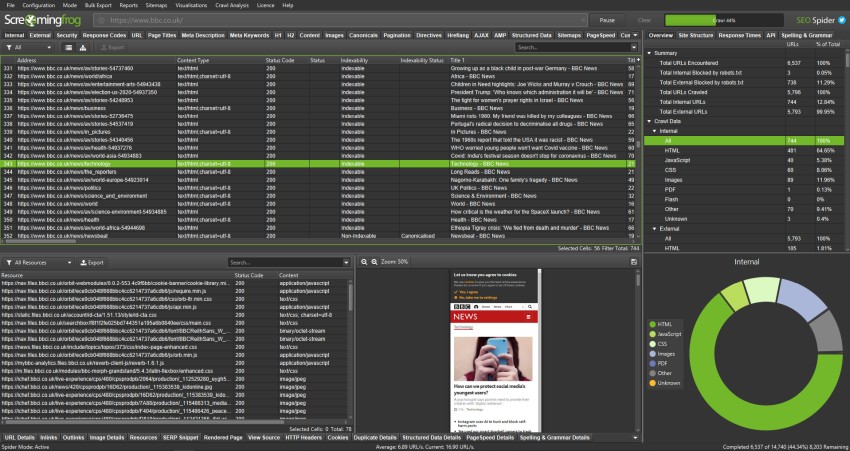
If technical SEO had a utility belt, Screaming Frog SEO Spider would be one of the sharpest tools clipped to it. It is the kind of software that makes messy websites less mysterious and bad SEO decisions much harder to hide. At first glance, it looks like a desktop crawler built for people who enjoy tabs, filters, exports, and the occasional existential crisis caused by 12,000 duplicate title tags. But once you use it properly, you realize it is much more than a glorified link checker.
For SEOs, content teams, developers, and site owners, Screaming Frog helps answer one simple but powerful question: What is really happening on this website? Not what the CMS claims. Not what the homepage suggests. Not what everyone hopes is true after a redesign. The crawler shows what search engines and users are more likely to encounter, page by page, status code by status code, canonical by canonical.
That is why this tool has earned such a strong reputation in the SEO world. It can crawl websites, audit metadata, evaluate redirects, inspect canonicals, review robots directives, discover duplicate content, generate XML sitemaps, and even render JavaScript-heavy pages. It also becomes much more useful when paired with data from Google Analytics, Google Search Console, and PageSpeed Insights. In other words, it is not just a crawler. It is an SEO microscope with very little patience for sloppy site architecture.
What Is Screaming Frog SEO Spider?
Screaming Frog SEO Spider is a desktop-based website crawler designed to audit technical and on-page SEO issues at scale. You enter a website, start a crawl, and the software gathers data across URLs so you can evaluate how a site is built, linked, tagged, redirected, rendered, and surfaced to search engines.
The tool is available for Windows, macOS, and Linux, which already earns it points from teams with mixed setups and strong opinions about operating systems. The free version lets you crawl up to 500 URLs, which is enough for smaller sites, sample audits, or quick checks. Once you move beyond that, the paid version opens the door to deeper configuration, saving crawls, JavaScript rendering, API integrations, scheduling, custom extraction, and larger-scale workflows.
That last point matters. A lot of SEO tools are excellent at dashboards and mediocre at investigation. Screaming Frog is built for investigation. It helps you move from “something feels off” to “here are the exact URLs, here are the inlinks, here are the directives, and here is where the mess begins.” That is a beautiful thing.
Why SEOs Still Love It
The software remains a favorite because it is practical. It does not try to charm you with vague scores and motivational buzzwords. Instead, it gives you crawl data you can actually use. That includes response codes, redirect chains, missing metadata, duplicate pages, canonical issues, blocked URLs, hreflang errors, image problems, structured data issues, and much more.
For technical SEO, that level of detail is gold. Search visibility depends on whether search engines can crawl, render, and index your pages correctly. If they cannot, even your best content can end up performing like a Broadway star stuck in a locked dressing room.
This is where Screaming Frog stands out. It supports the kind of auditing that aligns closely with how modern search works. Google’s documentation emphasizes crawlability, canonical consistency, robots directives, and sitemap accuracy. Bing also highlights technical site health and crawl accessibility. Screaming Frog gives you a fast way to inspect those signals across a site instead of checking them one URL at a time until your coffee goes cold.
Core Features That Make the Tool Worth Using
1. Crawl Websites Like a Search-Focused Detective
The main job of Screaming Frog is crawling websites and collecting SEO-relevant data. In standard Spider Mode, it follows internal links and builds a site-level view of how URLs connect. This makes it easier to understand site architecture, internal linking, crawl paths, and content depth.
That matters because internal links are not just navigation. They are discovery signals. If important pages are buried too deep, weakly linked, or orphaned, they are harder for search engines to find and prioritize. A crawler helps expose those blind spots quickly.
2. Audit Redirects Without Losing Your Mind
Redirect problems are common, expensive, and surprisingly good at hiding in plain sight. Screaming Frog can identify temporary and permanent redirects, redirect chains, loops, meta refreshes, and JavaScript-based redirects. That is useful during site migrations, HTTPS moves, URL restructures, and cleanup projects.
Why does this matter? Because a bad redirect setup can waste crawl resources, slow down the user journey, and muddy canonical signals. In general, permanent changes should act like permanent changes, and temporary changes should stop pretending they are forever. The software makes it easier to separate those cases before your site starts acting like a confused GPS.
3. Check Titles, Meta Descriptions, and Headings at Scale
Yes, titles and meta descriptions are basic. No, basic does not mean unimportant. Screaming Frog helps surface missing, duplicated, too long, too short, and poorly optimized title tags and meta descriptions. It also helps you inspect headings and other on-page elements that support content clarity and click-through performance.
That is useful for SEO teams, but also for editorial teams doing content refreshes. You can quickly find pages that need rewriting, consolidation, or stronger differentiation. On large sites, this can save days of manual review and uncover patterns that would otherwise stay buried.
4. Compare Raw HTML vs. Rendered HTML
This is one of the smartest reasons to use the tool today. On JavaScript-heavy sites, what appears in the browser is not always what search engines receive first. Screaming Frog can render pages using an integrated Chromium-based engine, which helps audit dynamic content on frameworks like React, Angular, and Vue.
That is incredibly useful when a page title, meta description, canonical, or important content only appears after rendering. Google has repeatedly advised that canonical signals should stay consistent, especially on JavaScript-driven pages. Screaming Frog helps you catch those mismatches by showing the difference between the original HTML and the rendered result.
5. Generate XML Sitemaps That Make Sense
The tool can generate XML sitemaps and image sitemaps, which is handy when you need a clean export of canonical, indexable URLs. That said, a sitemap is a hint, not a magic trick. Search engines may use it to discover or prioritize URLs, but submitting a sitemap does not guarantee indexing.
Still, when you are managing medium or large sites, a good sitemap matters. Screaming Frog helps you create one from a crawl while filtering out pages that should not be there in the first place, such as redirects, non-indexable URLs, or duplicate versions.
6. Use List Mode for Precision Work
List Mode is where the tool starts feeling especially efficient. Instead of crawling an entire site, you upload a list of URLs and audit only those pages. That is perfect for migration checks, QA reviews, content updates, redirect testing, or page-by-page diagnostics.
For example, if you have 300 URLs from a recent blog refresh, you can crawl just those pages, inspect status codes, validate canonicals, review metadata, and even pull API data. It is a focused workflow, and focused workflows are what separate pros from people who audit entire sites when they only needed 50 pages.
7. Pull in Real Performance Data Through Integrations
One of the best upgrades in modern Screaming Frog workflows is integration. You can connect the crawler to Google Analytics, Google Search Console, and PageSpeed Insights, as well as other data sources such as Ahrefs and Moz. This turns a technical crawl into a more strategic audit.
Now you are not just looking at a page with a missing meta description. You are looking at a page with a missing meta description that also gets impressions, has poor click-through rate, loads slowly, and maybe should not be orphaned from your navigation in the first place. That is how you prioritize like an adult and not a raccoon with a spreadsheet.
How Screaming Frog Helps Solve Real SEO Problems
Site Migrations
During a migration, Screaming Frog becomes a safety net. You can crawl the old site, crawl the new site, upload redirect lists, and review chains, loops, 404s, canonicals, and noindex directives. This helps reduce one of the most common migration mistakes: launching a technically “finished” site that quietly burns down organic visibility.
Content Audits
For content-heavy sites, the tool helps identify duplicate pages, thin tag pages, stale metadata, pagination quirks, weak internal linking, and URLs that attract impressions without strong optimization. Pair the crawl with Search Console data, and you can spot pages that deserve updates rather than deletion.
JavaScript SEO Checks
If your site depends heavily on client-side rendering, the crawler becomes essential. You can inspect whether key content, canonicals, and metadata appear in rendered HTML, whether blocked resources are affecting rendering, and whether your site is sending mixed signals between source code and final output.
Indexation Cleanup
Many sites have more indexable URLs than they think and fewer useful ones than they want. Screaming Frog helps identify non-indexable pages, pages blocked by robots, pages with noindex, duplicate versions, soft issue patterns, and XML sitemap mismatches. This makes it easier to clean up what search engines can reach and what they should care about.
Best Practices for Using the Tool Well
Like most powerful software, Screaming Frog is only as helpful as the person driving it. Here are a few smart ways to get more value from it.
- Start with a goal. Do not crawl first and think later. Decide whether you are auditing redirects, metadata, rendering, internal links, or indexation.
- Use segments. Audit templates, blog folders, product pages, or migrated URLs separately when possible.
- Prioritize impact. Not every issue deserves a fire drill. Pages with traffic, conversions, or strong search visibility should usually come first.
- Compare data sources. Crawl data alone is useful. Crawl data plus Search Console and analytics is better.
- Do not confuse robots.txt with noindex. If the goal is to keep a page out of search, robots.txt is not your all-purpose invisibility cloak.
- Watch canonical consistency. Your sitemap, HTML, and rendered output should not behave like three different departments with zero communication.
Limitations to Keep in Mind
No crawler is perfect, and Screaming Frog does not pretend to be Googlebot with a British accent. Even the company notes that JavaScript rendering is still a simulation of search engine behavior, not a perfect mirror of it. That means you should use the tool as a powerful diagnostic system, not the sole judge of reality.
It is also desktop software, which some users love and others find a bit old-school. Very large crawls can require solid hardware, especially if you want to work at scale. The software can handle millions of URLs with the right setup, but that does not mean your laptop from three jobs ago is emotionally prepared for it.
My Experience and Practical Lessons From Using Screaming Frog
One of the most useful things about Screaming Frog is that it changes how you think about websites. Before using it regularly, it is easy to view a site the way a visitor does: page by page, section by section, usually through a nice navigation menu that is trying very hard to look organized. After using the crawler, you start seeing a site the way an SEO sees it: as a network of URLs, signals, directives, status codes, canonicals, and internal relationships that can either support performance or quietly sabotage it.
In real-world audits, I have found that the biggest wins rarely come from exotic SEO theories. They usually come from boring problems discovered at scale. A batch of pages missing self-referencing canonicals. Hundreds of old redirects still pointing through chains. Blog posts with duplicate title formats. Important pages buried too deep in the link structure. Pages getting impressions in Search Console but isolated from the internal navigation. Screaming Frog is excellent at turning those vague suspicions into proof.
It is also one of the few tools that feels equally useful for quick checks and large projects. On a smaller site, I might use it to crawl a few hundred URLs and confirm metadata, headings, image alt text, and status codes. On a bigger project, I lean on List Mode, API integrations, custom extraction, and crawl comparisons. That flexibility is a huge part of its value. You do not need an enterprise-sized website to get enterprise-grade insight from it.
Another thing I appreciate is how well it supports collaboration, even if indirectly. SEO audits often involve writers, developers, designers, and stakeholders who do not speak the same technical language. Screaming Frog helps bridge that gap because its exports make issues tangible. Instead of saying, “I think there may be rendering inconsistencies,” you can show the exact URLs where the canonical exists only in rendered HTML. Instead of saying, “our migration seems messy,” you can export the redirect chains and hand over a very awkward but useful spreadsheet.
Perhaps my favorite lesson from using the tool is this: data becomes valuable when it leads to cleaner decisions. Screaming Frog produces a lot of data, but the best users are not the ones who export everything. They are the ones who know what question they are trying to answer. Is the site wasting crawl resources? Are important pages indexable? Are JavaScript templates hiding crucial metadata? Are orphan pages sitting in the sitemap like forgotten leftovers? When you approach the tool with a focused question, it becomes incredibly efficient.
So yes, Screaming Frog SEO Spider can look intimidating at first. It has menus, tabs, filters, exports, and enough configuration options to make a new user blink twice. But once you learn how to use it, it becomes one of the most dependable tools in SEO. It does not replace judgment, strategy, or experience. It makes all three easier to apply.
Conclusion
Screaming Frog SEO Spider remains one of the most useful website crawlers in SEO because it solves real problems with practical depth. It helps uncover crawl issues, redirect problems, metadata gaps, rendering inconsistencies, sitemap mistakes, canonical conflicts, internal linking weaknesses, and indexation clutter. It works well for audits, migrations, content cleanups, and ongoing technical SEO maintenance.
In a world full of polished dashboards and vague “health scores,” this tool still stands out by doing something refreshingly honest: showing you what your website is actually doing. And in SEO, that is often the difference between guessing and improving.
SEO Tags

