
Makeup
The Ultimate Website Planning Template: Everything You Need to Get Right
Jun
Building a website without a plan is a little like grocery shopping while hungry: you will come home with three kinds of cheese, no dinner, and a receipt that makes you question your life choices. A website planning template saves you from that digital chaos. It turns “we need a new website” into a clear roadmap with goals, pages, content, SEO, design, performance, analytics, security, and launch tasks all neatly organized before anyone starts moving pixels around.
Whether you are creating a small business website, redesigning a company site, launching an online store, or building a content hub, the planning stage is where the real success happens. A beautiful homepage is nice. A beautiful homepage that loads fast, ranks in search, answers customer questions, collects leads, works on mobile, and does not collapse during checkout is much nicer.
This guide gives you a practical website planning template you can use before hiring a designer, briefing a developer, choosing a CMS, writing copy, or launching your site into the wild internet jungle. Let’s build the blueprint before we start swinging the hammer.
Why Website Planning Matters More Than the Design Mockup
Design is the shiny part. Planning is the part that keeps the shiny thing from becoming expensive decoration. A good website plan connects business goals with user needs. It answers essential questions before production begins: Who is the website for? What should visitors do? What content is needed? Which pages must rank on Google and Bing? What features are required? How will success be measured?
Without planning, teams often discover problems too late. The navigation does not match customer behavior. The copy is missing. The product pages have no SEO structure. The analytics are installed after launch, which is like starting a race and then tying your shoes halfway through. A website planning template helps prevent these issues by forcing clarity early.
The Ultimate Website Planning Template
Use the following structure as your website project worksheet. You can turn it into a spreadsheet, project board, document, or whiteboard session. The tool matters less than the thinking. A fancy template with bad decisions is still bad decisions wearing a tuxedo.
1. Define the Website Goal
Start with the main purpose of the website. Be specific. “We want a better website” is not a goal; it is a vague cry for help. A stronger goal sounds like: “Increase qualified demo requests by 30% in six months,” “Launch an ecommerce store with a 2% conversion rate target,” or “Create a resource center that grows organic traffic for non-branded keywords.”
Your template should include:
- Primary business goal
- Secondary goals
- Target audience
- Main conversion action
- Success metrics
- Timeline and launch deadline
Every later decision should point back to these goals. If a feature, page, or design idea does not support the goal or the user, it probably belongs in the “maybe later” parking lot.
2. Identify Your Audience and Their Intent
A website is not for “everyone.” Even the internet, a place where people watch raccoons steal cat food, has user intent. Your planning template should define audience groups and what each group needs from the website.
For example, a local roofing company may serve homeowners comparing replacement costs, emergency repair customers, insurance claim shoppers, and commercial property managers. Each visitor has different questions, urgency, and buying signals. A SaaS company may have founders, marketing managers, IT buyers, and procurement teams visiting the same site for different reasons.
Add these fields to your template:
- Audience segment
- Main problem or desire
- Common questions
- Decision stage: awareness, consideration, or purchase
- Best page or content type for that visitor
- Preferred conversion action
This step improves user experience, SEO, content planning, and conversion rate optimization because your site becomes a helpful guide instead of a brochure wearing a digital hat.
3. Map the Site Structure
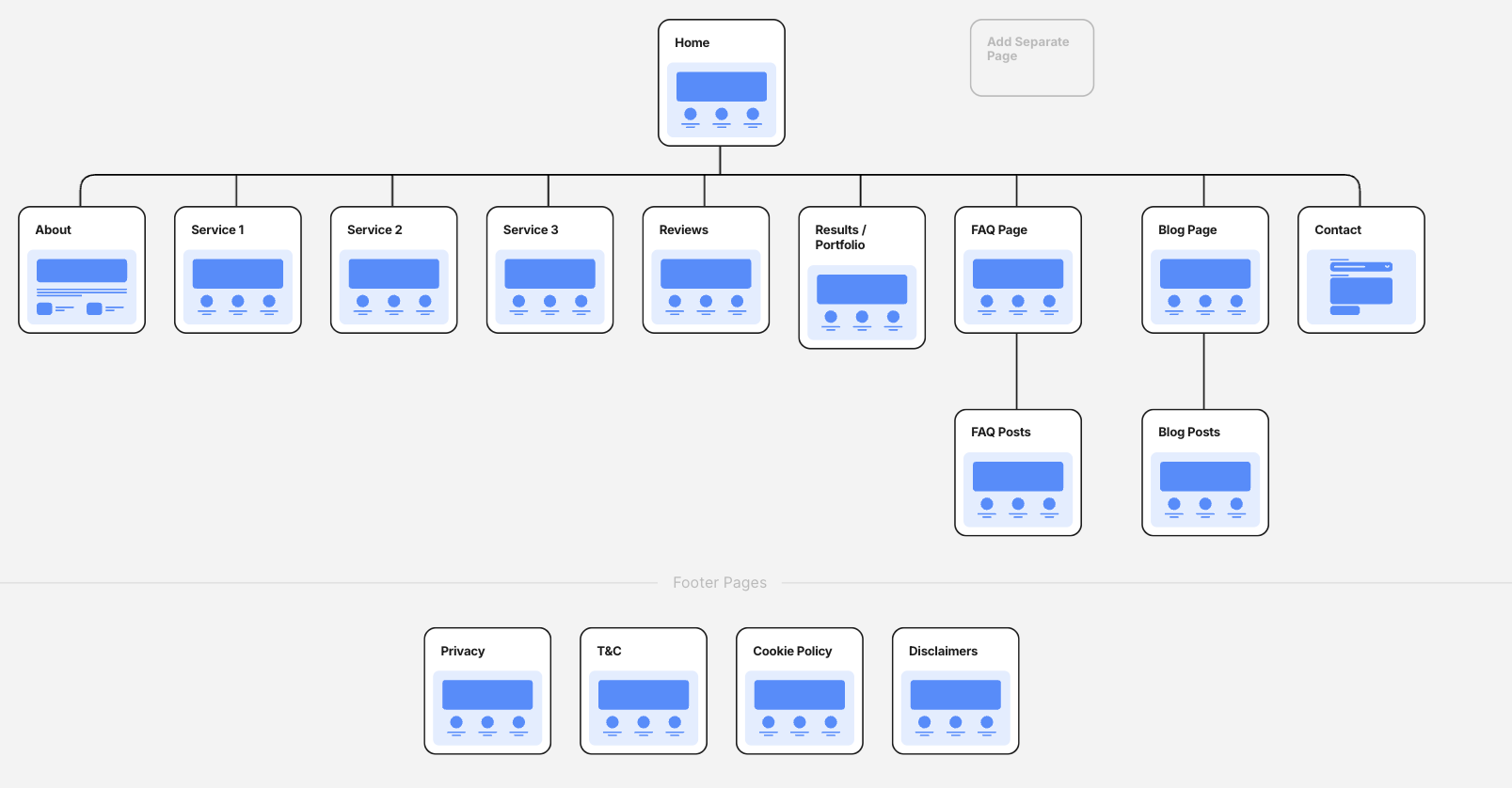
Information architecture is the art of organizing pages so visitors can find what they need without feeling like they have entered a maze designed by a caffeinated squirrel. Your website planning template should include a sitemap showing your main pages and how they relate to one another.
A simple business website might include Home, About, Services, Case Studies, Blog, Contact, Privacy Policy, and Terms. A larger site may need service category pages, location pages, resource hubs, product collections, comparison pages, support documentation, and landing pages.
For each page, document:
- Page name
- URL slug
- Purpose of the page
- Target audience
- Primary keyword
- Secondary keywords
- Call to action
- Content owner
- Status: planned, drafting, review, approved, published
Keep navigation clear. Visitors should understand where they are, where they can go next, and why they should care. Search engines also benefit from logical internal linking and organized content hierarchy.
4. Create a Content Inventory
If you are redesigning an existing website, do not skip the content inventory. List every current page, blog post, landing page, downloadable asset, product page, and important media file. Then decide what to keep, improve, merge, redirect, or delete.
Your content inventory should track:
- Existing URL
- Page title
- Current traffic
- Backlinks or SEO value
- Conversion performance
- Content quality
- Recommended action
- New destination URL if redirected
This is especially important for SEO. Deleting valuable pages without redirects can damage rankings and traffic. Updating weak pages can unlock growth. Merging thin content can make your site cleaner and more useful. It is digital housekeeping, but with fewer dust bunnies and more spreadsheets.
5. Build an SEO Plan Before Writing Copy
SEO should not be sprinkled on at the end like parsley on a sad restaurant plate. It should be baked into the website plan from the beginning. Google and Bing both reward websites that are technically accessible, easy to crawl, useful to users, and clear about their topics.
Your SEO planning section should include:
- Keyword research
- Search intent for each keyword
- Title tag plan
- Meta description plan
- Header structure
- Internal linking opportunities
- Image alt text needs
- Schema markup opportunities
- XML sitemap requirements
- Robots.txt review
- Redirect map for redesigned sites
For example, a page targeting “website planning template” should not merely repeat that phrase 47 times until readers feel trapped in an SEO elevator. It should answer related questions: what to include in a website plan, how to organize a sitemap, how to plan website content, how to prepare for launch, and how to measure performance.
Use natural language. Add related terms where they genuinely help: website strategy, site architecture, web design brief, launch checklist, content planning, user experience, technical SEO, conversion goals, and analytics setup.
6. Plan the User Journey and Calls to Action
Every page should have a job. Some pages educate. Some build trust. Some convert. Some help users compare options. Some answer questions so your sales team does not have to explain the same thing 600 times while slowly becoming one with their coffee mug.
In your template, assign each page a user journey stage and a call to action. Examples include:
- Read a guide
- Request a quote
- Book a demo
- Download a checklist
- Join an email list
- Start a free trial
- Buy now
- Contact support
Do not use the same aggressive CTA everywhere. A first-time visitor reading an educational blog post may not be ready to “Schedule a Strategic Enterprise Transformation Consultation.” They may, however, download a practical checklist or read a comparison guide. Match the CTA to the visitor’s readiness.
7. Choose the Right Platform and Technical Requirements
Your website planning template should include platform decisions. Will the site use WordPress, Shopify, Webflow, Wix, Squarespace, a headless CMS, or a custom framework? The right answer depends on budget, content needs, ecommerce features, integrations, team skill level, security requirements, and long-term maintenance.
Document technical needs such as:
- CMS or ecommerce platform
- Hosting requirements
- Payment processing
- CRM integration
- Email marketing integration
- Booking or scheduling tools
- Search functionality
- Multilingual support
- Membership or login features
- Accessibility requirements
- Backup and security needs
Choose technology based on the site’s actual needs, not because someone on the team heard a platform name on a podcast and now wants to “future-proof the stack.” Future-proofing is great. Overengineering a five-page brochure site like it is mission control for NASA is less great.
8. Plan for Mobile, Accessibility, and Performance
Modern websites must work across screen sizes, devices, browsers, and user abilities. Responsive design is no longer optional. Accessibility is not a decorative bonus. Performance is not something to “look at later” after the homepage hero video weighs as much as a small refrigerator.
Your template should include a quality checklist for:
- Mobile layout testing
- Readable font sizes
- Keyboard navigation
- Color contrast
- Alt text for meaningful images
- Clear form labels
- Fast loading pages
- Compressed images
- Reduced layout shifts
- Responsive menus
- Accessible buttons and links
Core Web Vitals and user experience metrics should be considered early. A fast, stable, responsive website helps visitors stay engaged and can support stronger search performance. Planning for speed at the beginning is easier than trying to rescue a slow site after launch with three plugins and a prayer.
9. Create a Visual and Brand Direction
Your website planning template should include brand basics before design begins. This does not mean debating button colors for six weeks. It means documenting the visual and verbal rules that make the site feel consistent.
Include:
- Logo files
- Brand colors
- Typography
- Image style
- Icon style
- Tone of voice
- Brand personality
- Competitor examples
- Websites you like and why
- Websites you dislike and why
Good design is not just “make it pop,” the famous phrase that has haunted designers since the dawn of gradients. Good design supports comprehension, trust, and action. It helps users understand what you offer and why it matters.
10. Prepare Copy and Content Assets
One of the most common website delays is missing content. The design is ready. The developer is ready. The launch date is staring at everyone like an unpaid parking ticket. Then someone says, “Who is writing the About page?” Silence. A tumbleweed crosses the Zoom call.
Prevent this by listing every content asset needed:
- Homepage copy
- Service page copy
- Product descriptions
- Team bios
- Case studies
- Testimonials
- FAQs
- Blog content
- Images and graphics
- Videos
- Downloads or lead magnets
- Legal pages
Assign owners and deadlines. Content production is not magic. It needs interviews, outlines, drafts, reviews, revisions, approvals, and formatting. Planning this early makes launch smoother and protects your team from last-minute copy panic.
11. Build an Analytics and Measurement Plan
A website without analytics is like a store with no cash register, no door counter, and a manager who says, “I feel like people are buying things.” Your planning template should include analytics before launch so you can measure what matters from day one.
Track:
- Traffic sources
- Page views
- Engagement metrics
- Form submissions
- Phone clicks
- Email clicks
- Purchases
- Demo requests
- Downloads
- Newsletter signups
- Important funnel steps
Set up tools such as Google Analytics 4, Google Search Console, Bing Webmaster Tools, tag management, heatmaps, session recordings, or CRM tracking depending on your business needs. More tools are not always better. The best setup is one your team can actually understand and use.
12. Do Security and Legal Planning
Security is not the glamorous part of website planning, but neither is locking your front door, and most people still do that. Your template should include basic security and compliance tasks.
Plan for:
- SSL certificate
- Strong passwords
- Multi-factor authentication
- Limited admin access
- Regular backups
- Software updates
- Spam protection
- Privacy policy
- Cookie notice if needed
- Terms of use
- Data collection review
- Incident response contact
If you collect personal information through forms, purchases, accounts, or newsletter signups, be clear about what you collect and why. For regulated industries, talk with legal counsel. Website planning should reduce risk, not create a beautiful liability machine.
Website Launch Checklist
Before the site goes live, run a full pre-launch review. This is the moment to catch broken links, missing metadata, awkward mobile layouts, incorrect forms, and that one placeholder headline that still says “Lorem ipsum, but make it profitable.”
Pre-Launch Tasks
- Proofread every page
- Test forms and thank-you pages
- Check mobile layouts
- Review title tags and meta descriptions
- Compress images
- Test page speed
- Check internal links
- Set up redirects
- Submit XML sitemap
- Verify analytics tracking
- Connect Search Console and Bing Webmaster Tools
- Test checkout if ecommerce
- Review accessibility basics
- Confirm backup system
- Prepare launch announcement
After launch, monitor performance closely for the first few weeks. Check indexing, traffic, conversions, crawl errors, form submissions, and user behavior. A website launch is not the finish line; it is the beginning of improvement.
Example Website Planning Template
Here is a simple layout you can copy into a spreadsheet:
| Planning Area | Key Questions | Owner | Status |
|---|---|---|---|
| Business Goals | What should the website accomplish? | Leadership | Draft |
| Audience | Who are the main visitors and what do they need? | Marketing | Draft |
| Sitemap | Which pages are required? | UX/SEO | In Review |
| SEO | Which keywords and search intents support each page? | SEO Specialist | Planned |
| Content | What copy, images, video, and downloads are needed? | Content Team | In Progress |
| Design | What visual direction supports the brand and user journey? | Designer | Planned |
| Development | What platform, features, and integrations are required? | Developer | Planned |
| Analytics | Which conversions, events, and KPIs will be tracked? | Marketing Ops | Planned |
| Launch | What must be tested before publishing? | Project Manager | Pending |
Common Website Planning Mistakes
Planning Around Internal Opinions Instead of User Needs
Your homepage should not be a committee scrapbook. It should help visitors understand what you do, why it matters, and what to do next. Internal preferences matter, but user needs matter more.
Skipping SEO Until After Launch
SEO affects structure, copy, URLs, metadata, internal links, and content strategy. Adding SEO later usually means reworking pages that could have been built correctly the first time.
Writing Too Much About Yourself
Visitors care about their problems first. Explain your value clearly, but do not make every page sound like an award acceptance speech. Helpful beats boastful.
Forgetting Maintenance
A website needs updates, backups, security checks, content refreshes, and performance reviews. Plan who will maintain it after launch. The internet does not reward abandoned gardens.
Experience Notes: What Real Website Planning Teaches You
After working through website planning projects, one lesson becomes obvious: the hardest part is rarely the technology. It is alignment. Teams often think they agree until the planning template asks specific questions. What is the main conversion? Which audience matters most? Should the homepage focus on trust, pricing, product education, or lead generation? Suddenly, everyone discovers they were carrying different versions of the website in their heads.
A good website planning template brings those hidden assumptions into the open. It gives the marketing team, leadership, designer, developer, writer, and SEO specialist one shared map. That map does not eliminate debate, but it makes the debate useful. Instead of arguing about whether a button should be blue or green, the team can ask whether the page has a clear goal, whether the copy answers the right question, and whether the call to action matches the visitor’s intent.
Another practical lesson is that content always takes longer than expected. Always. Even when everyone promises the copy is “basically ready,” it usually needs restructuring, editing, approval, SEO review, formatting, and sometimes a gentle rescue mission. The best projects treat content as a core workstream, not a box to check after the design is finished. Strong copy clarifies design. Weak or missing copy forces designers to guess, and guessing is how you get three identical homepage sections saying “innovative solutions for modern businesses.”
Website planning also teaches the value of prioritization. Not every idea belongs in version one. A launch plan should separate must-have features from nice-to-have features. For example, a small service business may need clear service pages, local SEO, strong contact forms, testimonials, and analytics before it needs a complex client portal. An ecommerce startup may need product pages, checkout testing, shipping rules, abandoned cart flows, and customer support content before it needs a giant editorial magazine. The best website is not the one with the most features. It is the one that supports the most important user actions reliably.
Performance planning is another area where experience matters. It is much easier to design a fast website than to fix a slow one later. Large images, heavy scripts, unnecessary animations, and too many third-party tools can quietly damage the user experience. A planning template that includes performance requirements helps the team make smarter choices early. The goal is not to make the website boring. The goal is to make it beautiful without requiring visitors to age noticeably while it loads.
Finally, post-launch planning is where good websites become great. The launch is not the end of the project; it is the first real test. Real users will reveal confusing navigation, weak calls to action, search queries you did not expect, pages that outperform expectations, and forms that need improvement. Teams that plan analytics, testing, and content updates before launch are better prepared to learn from the data. They can improve the site month by month instead of treating it like a statue carved in code.
The ultimate website planning template is not just a checklist. It is a decision-making tool. It keeps the project focused, protects the budget, improves collaboration, and gives the final website a much better chance of doing its actual job. In other words, planning is not the boring part. Planning is the part that keeps the exciting part from becoming expensive chaos with a nice font.
Conclusion
A successful website begins long before the first design mockup. It starts with goals, audience research, sitemap planning, SEO strategy, content preparation, technical decisions, accessibility, analytics, security, and a launch checklist that catches problems before visitors do. The ultimate website planning template helps you organize all of these moving parts into one practical roadmap.
Use it to clarify priorities, assign ownership, reduce confusion, and build a website that is not only attractive but useful, searchable, measurable, secure, and ready to grow. A good website should look polished, load quickly, answer real questions, guide users naturally, and support business goals without making everyone involved question their career choices. That is the power of planning.
Note: This article is original, publishing-ready content based on current best practices in website planning, UX, SEO, accessibility, performance, analytics, security, content strategy, and launch preparation. No external citation markup or unnecessary source-code references have been inserted.

