
Hair Care
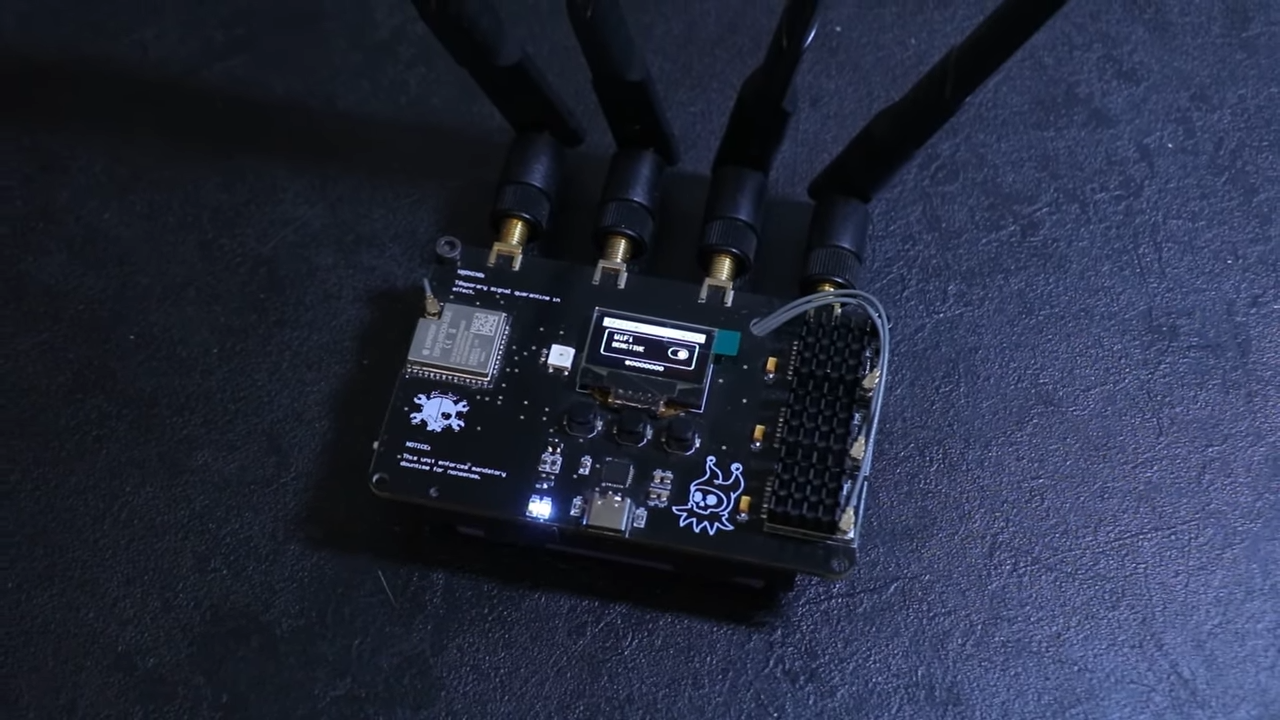
Simple Device Can Freeze Wi-Fi Camera Feeds
May
Wi-Fi cameras have become the tiny, blinking eyes of modern life. They watch front doors, garages, shops, warehouses, baby rooms, parking lots, and occasionally a raccoon who seems far too comfortable using the patio furniture. They are affordable, easy to install, and often require little more than a power outlet and a smartphone app. That convenience is exactly why millions of people rely on them.
But convenience has a small catch: wireless cameras depend on wireless communication. If that communication is disrupted, the camera may keep filming locally, pause its upload, lose connection to the app, or appear frozen. Recent public demonstrations have shown that a relatively simple device can interfere with nearby wireless camera feeds, causing live video to freeze or drop. That sounds like a spy-movie plot, but the lesson is much more practical: a security system is only as strong as the network it depends on.
The phrase “simple device can freeze Wi-Fi camera feeds” should not send everyone running to throw their smart doorbell into the nearest drawer. Wi-Fi cameras are still useful. They can deter theft, document deliveries, help check on pets, and provide valuable evidence. The real takeaway is that cameras should be part of a layered security plan, not the entire plan. A camera that depends only on Wi-Fi is like a guard dog with noise-canceling headphones: helpful most of the time, but not invincible.
What Does It Mean When a Wi-Fi Camera Feed Freezes?
A frozen camera feed usually means the viewing device is no longer receiving fresh video packets from the camera. The image on the screen may look normal at first glance, but it is actually a still frame. In some apps, the video may show a loading symbol. In others, the feed may remain stuck on the last successful image, which can be confusing because it looks like everything is calm. Spoiler: everything is not always calm.
There are many harmless reasons a Wi-Fi camera feed can freeze. The router may be overloaded. The camera may be too far from the access point. A microwave, thick wall, metal garage door, or crowded apartment building can make wireless performance wobble. Firmware bugs, weak power supplies, cheap cloud servers, and app glitches can also cause interruptions. Not every frozen frame is a cyberattack. Sometimes the villain is simply a bargain-bin router doing its best impression of a potato.
However, intentional interference is also possible. A device that floods the radio environment or disrupts wireless management traffic can prevent a Wi-Fi camera from maintaining a stable connection. The result may be a camera that cannot upload video to the cloud, cannot send alerts, or cannot display a live feed. In a security context, even a short outage can matter.
Why Wi-Fi Cameras Are Vulnerable to Wireless Disruption
Wi-Fi cameras communicate over shared radio spectrum. Unlike a wired Ethernet camera, which sends data through a physical cable, a wireless camera has to compete with every other device using the same airspace. Phones, laptops, smart TVs, speakers, thermostats, baby monitors, and neighboring routers all add traffic. When the signal is strong and the network is well configured, this works beautifully. When the signal is weak or the channel is noisy, reliability drops.
Wireless Convenience Comes With Shared-Air Risk
Wi-Fi is designed to be flexible, not magical. Devices take turns talking. They listen, transmit, wait, retry, and adjust. If the wireless environment becomes crowded or hostile, packets may fail to arrive. Video is especially sensitive because it requires a steady stream of data. A web page can load slowly and still be readable. A security feed that loses packets may stutter, blur, delay, or freeze.
Cloud Cameras Depend on Multiple Links
Many consumer cameras do not simply record to a local device. They send video through a router, across the internet, into a cloud platform, and back to the user’s phone. That means the camera depends on the camera hardware, Wi-Fi signal, router, internet connection, vendor service, mobile app, and account security. A failure at any point can affect what the owner sees. Wireless disruption is only one piece of the puzzle, but it is a piece worth understanding.
Jamming vs. Deauthentication: Two Different Problems
People often use the word “jamming” for any wireless disruption, but not every attack works the same way. At a high level, there are two broad categories people discuss when Wi-Fi cameras go offline: radio interference and deauthentication-style disruption. Both can interrupt a camera feed, but they are different in concept.
Radio Interference
Radio interference happens when the wireless environment becomes too noisy for normal communication. Imagine trying to have a conversation in a quiet kitchen, then suddenly a marching band enters through the pantry. The words may technically still exist, but good luck understanding them. In a Wi-Fi camera scenario, strong interference can make it difficult for legitimate packets to get through.
In the United States, intentionally using devices that interfere with authorized radio communications is illegal. That includes many types of jamming devices marketed online as privacy gadgets, anti-drone tools, or security blockers. The law is not a tiny footnote hiding behind the router. It is a major issue because interference can affect emergency communications, business networks, public safety equipment, and innocent neighbors.
Deauthentication-Style Disruption
Another category involves abusing Wi-Fi management behavior to make a device disconnect from its access point. This is often discussed in security circles as a denial-of-service problem. The important defensive point is simple: some older Wi-Fi configurations do not strongly protect certain management frames, which can make disruption easier. Newer security features, especially WPA3 and Protected Management Frames, are designed to reduce this risk when supported and properly configured.
This article will not provide operational steps, tool names, or attack instructions. The useful question for homeowners and businesses is not “How does someone do it?” The useful question is “How do I make my camera system harder to interrupt and easier to monitor?” That is where the practical value lives.
Is a Frozen Wi-Fi Camera Feed Always a Sign of an Attack?
No. A frozen feed is a symptom, not a diagnosis. It is like a cough: sometimes it is serious, sometimes you swallowed a crumb while pretending you were not eating crackers over the keyboard. Before assuming malicious interference, check ordinary causes.
Start with signal strength. Cameras mounted outside often sit at the edge of Wi-Fi coverage. Brick, stucco, metal siding, garage doors, and low temperatures can affect performance. Next, check power. A camera with an aging adapter or weak battery may disconnect under load. Then examine router logs, app history, and device health alerts. If several Wi-Fi devices fail at the same time, the router or internet connection may be the issue. If only one outdoor camera drops at suspicious times, the pattern deserves closer attention.
Repeated freezes during specific events, such as late-night driveway activity, package deliveries, or attempts to enter a property, should be taken seriously. Still, the response should remain lawful and evidence-based. Save logs, note times, check neighboring devices, and consider professional help if the pattern continues.
Why Criminals Might Target Wi-Fi Cameras
A camera changes behavior. People are less likely to steal a package, break into a shed, or vandalize property when they think they are being recorded. That is why disabling a camera, even briefly, can be attractive to someone with bad intentions. If a camera feed freezes before a theft, the owner may be left with a perfect still image of an empty driveway and no footage of what happened next. Very cinematic, very annoying.
Wireless cameras are especially tempting because attackers do not necessarily need physical access to the camera. A porch camera mounted high on a wall may be hard to reach, but its wireless connection extends beyond the wall. This is why network design matters. The camera may be outside, but the real security boundary includes the router, wireless settings, account protections, storage method, and alerting system.
How to Protect Wi-Fi Camera Feeds Without Becoming a Network Engineer
The good news is that homeowners and small businesses can reduce risk without turning the living room into a data center. The goal is not perfection. The goal is resilience. A resilient camera setup can keep recording, alert the owner when something goes wrong, and recover quickly.
Use Wired Cameras Where Coverage Really Matters
If a camera protects a critical entrance, cash register, inventory room, server closet, or driveway gate, consider using a wired camera. Power over Ethernet, often called PoE, sends power and data through one cable. Wired cameras are not immune to every problem, but they do not depend on Wi-Fi for video transmission. For serious security, wired cameras connected to a local recorder are usually more reliable than fully wireless cloud-only cameras.
Choose Cameras With Local Recording
Look for cameras that can continue recording to a local SD card, home hub, or network video recorder when the internet connection drops. Cloud storage is convenient, but local recording adds a safety net. If the live feed freezes, local footage may still exist. That difference can turn “we have no idea what happened” into “we have the clip.”
Enable Offline Alerts
Many camera apps can notify users when a device goes offline. Turn that feature on. An offline alert is not proof of interference, but it is valuable evidence. If a camera repeatedly disconnects for short periods, timestamps can help you compare outages with router logs, motion events, deliveries, or other incidents.
Upgrade Wi-Fi Security Settings
Use WPA3 when all your devices support it. If your router offers Protected Management Frames, review the setting and enable it where compatible. In mixed networks with older devices, you may need to test carefully because some legacy products behave badly when stronger settings are required. Security upgrades are wonderful, but only if the camera can still connect without throwing a digital tantrum.
Separate Cameras From Personal Devices
Create a separate network for cameras and other smart devices when your router supports it. This may be a guest network, dedicated IoT network, or VLAN in more advanced setups. Segmentation limits damage if one device is compromised. Your laptop, tax files, business documents, and family photos should not have to share a bunk bed with every discount smart plug in the house.
Use Strong Passwords and Multi-Factor Authentication
Camera security is not only about radio signals. Many real-world camera incidents involve weak passwords, reused credentials, exposed accounts, or poor vendor safeguards. Use a unique password for the camera account and enable multi-factor authentication. If the camera brand supports end-to-end encryption or enhanced privacy controls, review those settings too.
Keep Firmware Updated
Firmware updates can patch vulnerabilities, improve stability, and add security features. Choose manufacturers with a visible update history and clear support policy. A camera that never receives updates may become less secure over time, even if it looked shiny and responsible on the shelf.
Better Camera Placement Can Improve Reliability
Camera placement is not only about getting the best angle of the porch pirate’s hoodie. It also affects signal quality. A camera mounted behind brick, metal, concrete, or dense landscaping may struggle. Try to keep cameras within strong Wi-Fi coverage, and avoid placing the router in a cabinet, basement corner, or behind a fish tank. Water is not a famous friend of wireless signals, even when the fish seem trustworthy.
For outdoor areas, consider adding a properly placed mesh node or wired access point. Do not simply add random repeaters everywhere. Poorly configured extenders can make roaming and reliability worse. A planned network with strong signal, clean channels, and reasonable device load will outperform a chaotic pile of blinking plastic boxes.
How Businesses Should Think About Wi-Fi Camera Security
Small businesses often install Wi-Fi cameras because they are fast and inexpensive. That is understandable. A shop owner may need visibility over entrances, storage rooms, registers, and parking areas without hiring a full installation crew. But businesses face higher stakes. Lost footage can affect insurance claims, employee safety, customer disputes, and police reports.
Businesses should document camera locations, recording methods, retention periods, user permissions, and outage alerts. Administrative access should be limited to trusted staff. Former employees should be removed immediately. Cameras should sit on a separate network, and the router should be business-grade enough to provide logs, updates, and reliable monitoring. If the site handles valuable inventory, wired cameras and local recording are worth the extra planning.
Legal and Ethical Reality: Do Not Interfere With Other People’s Cameras
It may be tempting for curious hobbyists to test wireless disruption “just to see what happens.” Do not do that on networks or devices you do not own and control. Interfering with communications can create legal trouble and real harm. It can also disrupt medical devices, emergency calls, business systems, and neighbors who simply want to stream a movie without wondering why the Wi-Fi has developed stage fright.
If you suspect someone is intentionally interfering with your camera system, document the pattern. Save screenshots, offline alerts, router logs, and incident times. Check for ordinary causes first. If the evidence suggests intentional interference, contact the camera vendor, internet provider, a qualified security professional, property management, or local authorities as appropriate. In the United States, suspected illegal radio interference can also be reported to the FCC.
What to Look for When Buying a New Wi-Fi Camera
Not all cameras are equal. Before buying, look beyond resolution and night vision. A 4K camera that drops offline whenever the network sneezes is not a security upgrade; it is a very expensive screensaver.
Important Features to Prioritize
Choose cameras with local recording, reliable offline alerts, secure account options, multi-factor authentication, regular firmware updates, WPA3 compatibility where available, and clear privacy controls. Check whether the camera can reconnect automatically after an outage. Review whether the manufacturer explains how long the device will receive security updates. If the product listing is full of vague promises and zero support details, keep shopping.
Consider the U.S. Cyber Trust Mark
The U.S. Cyber Trust Mark program is intended to help consumers identify smart products that meet cybersecurity criteria. As labeling becomes more visible, it may help buyers compare connected devices more easily. A label is not a force field, but it can be a useful signal when combined with reviews, manufacturer reputation, and technical features.
Specific Example: The Driveway Camera That Keeps Freezing
Imagine a homeowner with a Wi-Fi camera pointed at the driveway. Most days, it works. Then packages begin disappearing. The owner checks the app and finds several short gaps in the recording history. The camera did not capture the theft. It only shows a frozen frame before the package vanished. The first reaction might be, “Someone jammed my camera!” Maybe. But a careful response is better.
The homeowner checks signal strength and discovers the camera is barely connected through two exterior walls. The router is five years old and sitting behind a television. The camera has no local storage, and offline alerts are disabled. After improving router placement, enabling alerts, updating firmware, and adding a wired camera for the driveway, the system becomes much more reliable. If another outage happens, the owner gets a notification and still has local footage from the wired camera. That is resilience in action.
Experience Notes: What Real-World Setups Teach Us
In practical home and small-business security planning, the most common mistake is treating cameras like magic proof machines. People install one camera, see a crisp live view on day one, and assume the job is finished. Then the camera misses the one event that mattered because the Wi-Fi was weak, the cloud subscription expired, the battery was low, or the router rebooted at exactly the wrong moment. Technology has a wicked sense of timing.
The best experiences come from layered setups. A front-door camera is useful, but it becomes much better when paired with a motion light, a solid lock, a visible sign, and a second recording angle. A garage camera is useful, but it becomes stronger when the garage has a contact sensor and the camera records locally. A shop camera is useful, but it becomes more dependable when connected by Ethernet to a recorder in a locked office. The camera is not the entire security plan; it is one witness in a larger courtroom.
Another lesson is that alerts matter almost as much as footage. Many users do not realize their camera has been offline for days until they need a recording. That is like discovering your umbrella is missing after the thunderstorm has already started. Offline notifications, weekly device checks, and occasional test recordings can prevent unpleasant surprises. For businesses, assigning someone to review camera health is simple and valuable. For homeowners, a monthly five-minute check can catch dead batteries, weak Wi-Fi, and outdated firmware.
Real-world setups also show that “wireless” does not mean “place it anywhere.” Outdoor cameras mounted under eaves, behind thick walls, or on detached garages often struggle. People blame the camera, then the app, then the internet provider, and finally Mercury retrograde. Often, the true issue is signal quality. A wired access point, better router location, or PoE camera can solve problems that no amount of app reinstalling will fix.
Finally, security should not ignore privacy. Cameras can protect property, but they can also capture neighbors, guests, workers, and family members. Good camera ownership means using strong security settings, limiting account access, pointing cameras thoughtfully, and keeping recordings only as long as needed. The goal is to improve safety without turning daily life into a low-budget surveillance drama.
Conclusion
The idea that a simple device can freeze Wi-Fi camera feeds is unsettling, but it is not a reason to panic. It is a reason to design smarter. Wireless cameras are convenient and useful, yet they depend on a reliable radio connection, secure accounts, strong router settings, and thoughtful placement. If the camera protects something important, consider wired options, local recording, offline alerts, WPA3 or Protected Management Frames, network segmentation, firmware updates, and multi-factor authentication.
In other words, do not fire your Wi-Fi camera. Give it a better team. A camera with backup recording, strong network security, and proper monitoring is far more useful than a lonely cloud camera hanging on the edge of a weak signal. Security works best when it has layers, logs, alerts, and a little common sense. The raccoon on the patio may still get away with suspicious behavior, but at least your system will have a fighting chance.
SEO Tags

