
Skincare
Raspberry Pi 4 Brings Cloud Gaming To Nintendo Switch
Jul
The Nintendo Switch was designed to travel, but one inventive Raspberry Pi project asked a delightfully unnecessary question: what if the console could stay at home while the player traveled instead?
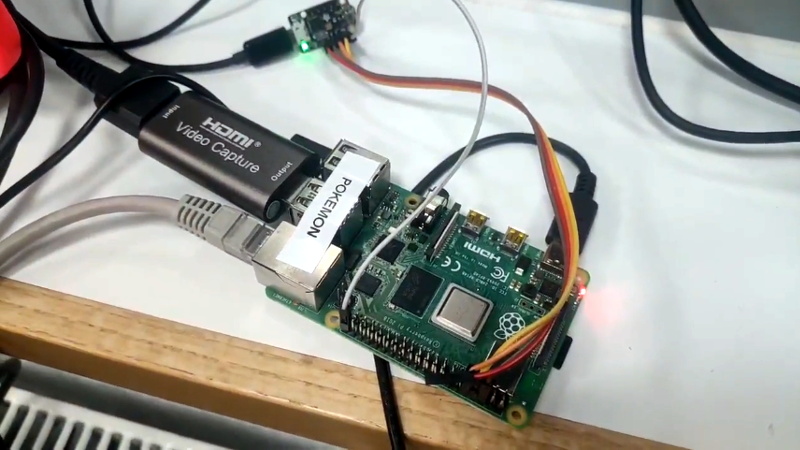
That question led developer Stan Dmitriev and the Surrogate.tv team to connect a real, docked Nintendo Switch to a Raspberry Pi 4, an inexpensive HDMI capture device, and an Adafruit Trinket M0. The result allowed someone using a web browser to view the Switch’s video output and control the console remotely over the internet. The creator reported total latency of approximately 100–110 millisecondsnoticeable, but still practical for slower games.
This was not emulation, a modified Switch operating system, or a mysterious cloud server stuffed with unauthorized game files. The games continued running on genuine Nintendo hardware. The Raspberry Pi simply became a compact bridge between the console and a remote player.
What This Raspberry Pi Cloud Gaming Project Actually Does
The phrase “cloud gaming” usually describes games rendered on remote servers and streamed to lightweight client devices. Nintendo’s own Cloud Version games work that way: the software runs on a server, while the console receives compressed video and sends control input back through the internet.
The Raspberry Pi 4 Nintendo Switch project uses a slightly different model. Instead of renting a powerful server, the owner supplies a physical Switch. The console remains in its dock, produces a normal HDMI signal, and accepts what it believes are commands from a compatible USB controller.
The Pi sits in the middle and handles two separate traffic lanes:
- Video lane: Capture the Switch’s HDMI output, encode it, and deliver it to a remote browser.
- Control lane: Receive button presses from the remote player and translate them into controller commands the Switch understands.
It is essentially a do-it-yourself remote-play appliance. Imagine an extremely small hotel concierge who watches your Switch, reports everything it sees, and presses buttons on request. Unlike a real concierge, it does not judge you for spending three hours reorganizing a Pokémon inventory.
How the Hardware Pipeline Works
1. The Nintendo Switch Supplies the Game
The Nintendo Switch performs all game logic, graphics rendering, save management, and online communication. Because the system is operating normally, the project does not need to emulate the console or reproduce Nintendo’s proprietary hardware.
When placed in its dock, the original Switch can output video through HDMI at up to 1080p in TV mode. That makes the dock’s HDMI port the natural place to obtain a clean video signal.
The major practical limitation is obvious: a Switch Lite cannot use a standard television dock and therefore does not provide the same convenient HDMI output path. This project is best suited to a dock-compatible Nintendo Switch model.
2. A USB Capture Device Grabs the Video
The Switch dock’s HDMI output connects to an HDMI-to-USB capture device. The original demonstration used a basic, inexpensive capture dongle rather than a premium broadcast card. Raspberry Pi OS can recognize many of these devices as ordinary USB video sources, much like webcams.
The capture device converts the incoming HDMI signal into a format the Pi can process. Depending on the hardware, it may provide MJPEG, uncompressed video, or another supported format. Cheap adapters vary widely in quality, however. Two capture sticks that look identical in an online listing may produce different frame rates, color accuracy, heat levels, or delays. Welcome to the glamorous world of mystery electronics.
A low-cost card may be sufficient for a proof of concept, but builders should prioritize predictable Linux compatibility and low capture latency over impressive packaging. A box covered in lightning bolts does not necessarily contain faster silicon.
3. The Raspberry Pi 4 Encodes and Streams the Feed
The original build used a 2GB Raspberry Pi 4. Its job was not to render the game but to capture video, compress the stream, manage network communication, and forward user input.
The Raspberry Pi 4 includes Gigabit Ethernet, dual-band Wi-Fi, USB 3.0 ports, and hardware-assisted H.264 encoding. Its official specifications include H.264 encoding at up to 1080p and 30 frames per second, making the board particularly well suited to compact streaming projects.
Hardware encoding is important because real-time video compression can consume substantial CPU resources. By using the Pi’s dedicated media capabilities, the system can produce a practical stream without forcing all four CPU cores to perform the mathematical equivalent of sprinting uphill while carrying groceries.
The original project relied on SurroRTG, a remote-interaction SDK associated with Surrogate.tv. The platform was designed to combine low-latency video with browser-based controls for physical machines, robots, consoles, RC vehicles, and similar devices. Raspberry Pi later highlighted projects that used the same approach to operate pinball machines and Nintendo Switch games remotely.
4. The Trinket M0 Pretends to Be a Controller
Streaming the screen solves only half the problem. A remote player also needs a way to press buttons.
For this task, the project used an Adafruit Trinket M0. This tiny microcontroller contains a 32-bit ATSAMD21 processor and supports native USB, allowing it to behave like a keyboard, mouse, serial device, storage device, or Human Interface Device.
The Trinket ran firmware based on the NSGadget_Pi project, which allows compatible hardware to impersonate a Nintendo Switch controller. The Raspberry Pi sent controller instructions to the Trinket over a UART serial connection. The Trinket then presented those instructions to the Switch through USB as recognizable gamepad input.
The NSGadget_Pi documentation describes a 2-megabit-per-second UART link between the Raspberry Pi and the controller-emulating device. That is far more bandwidth than simple button, trigger, and analog-stick messages require.
The complete control path looks like this:
- The remote player presses a key or controller button.
- The browser sends the command through the remote-play platform.
- The Raspberry Pi receives and interprets the command.
- The Pi forwards the appropriate controller state over UART.
- The Trinket M0 reports that state to the Nintendo Switch as USB gamepad input.
In technical terms, it is elegant. In nontechnical terms, the Trinket wears a tiny controller costume and the Switch politely plays along.
Where the 100-Millisecond Delay Comes From
Every part of a remote-gaming system contributes some delay. The capture adapter buffers frames. The Pi processes and encodes them. Packets travel through routers and internet service providers. The browser decodes the stream and draws it on the screen. Button presses then make the return trip.
The project’s reported 100–110 ms total delay is therefore a combination of capture latency, encoding time, network latency, browser decoding, command transmission, and display response.
That delay is too large for an ideal competitive experience in games such as Super Smash Bros. Ultimate, precision platformers, rhythm games, or twitch-heavy shooters. A tenth of a second can be the difference between a brilliant dodge and watching a character fall into a pit while you insist, correctly, that you pressed the button.
However, the same delay matters much less in turn-based role-playing games, strategy games, life simulations, menu-driven adventures, and slower exploration titles. Games such as Pokémon Sword, which was used in the original demonstration, are forgiving because most decisions do not depend on frame-perfect reactions.
Network quality remains essential. Nintendo’s own cloud-gaming guidance recommends a persistent high-speed connection, a wired network whenever possible, and the 5 GHz Wi-Fi band when Ethernet is unavailable. The same principles apply to a homemade Raspberry Pi remote-play system.
Why Raspberry Pi 4 Was a Strong Choice
The Raspberry Pi 4 occupies a useful middle ground. It is inexpensive and compact but powerful enough to handle hardware-assisted encoding, USB capture, networking, serial communication, and a lightweight control application at the same time.
Its Gigabit Ethernet port is especially valuable. A wired connection reduces interference, packet loss, and sudden latency spikes. Wi-Fi can work, particularly on a clean 5 GHz network, but Ethernet removes one unpredictable wireless hop from an already complicated chain.
The board’s USB 3.0 ports also provide ample bandwidth for compatible capture devices. Meanwhile, the GPIO header exposes UART pins that can communicate directly with the controller-emulating microcontroller.
RAM is not the most important resource in this project. The original 2GB Pi 4 was sufficient because the workload focused on moving and encoding media rather than loading giant applications. More memory may make development or multitasking more comfortable, but it will not magically erase network latency.
What You Would Need to Build a Similar System
A modern recreation would generally require the following components:
- A dock-compatible Nintendo Switch and dock
- A Raspberry Pi 4 with a reliable power supply
- A microSD card with Raspberry Pi OS
- A Linux-compatible HDMI-to-USB capture device
- An Adafruit Trinket M0 or another USB-capable microcontroller
- Compatible controller-emulation firmware
- HDMI, USB, and UART wiring
- A wired network connection or strong 5 GHz Wi-Fi
- Low-latency streaming and browser-control software
- Cooling for sustained operation
Cooling deserves more attention than it usually receives. Video processing, USB traffic, and continuous network activity can keep a Raspberry Pi busy for long sessions. Raspberry Pi 4 systems can reduce clock speed when they become too hot, potentially creating inconsistent performance. Testing has shown that suitable heatsinks or fans can prevent throttling during sustained workloads.
A stable power supply is equally important. Capture dongles and connected microcontrollers draw power from the Pi’s USB ports or GPIO header. An inadequate adapter may cause undervoltage warnings, disconnected peripherals, corrupted storage, or the traditional Raspberry Pi troubleshooting ritual of blaming the software for a power problem.
Software Options and Modern Considerations
The original system was built around SurroRTG, whose public SDK included Python tools, game templates, device controls, and a separate streaming component. The repository’s latest listed public release dates to July 2021, so it should be treated primarily as an archival reference rather than assumed to be a fully maintained, ready-to-deploy platform today.
A present-day builder could reproduce the overall architecture with maintained self-hosted technologies. A browser-facing interface might use WebRTC for low-latency audio and video, while WebSockets or a WebRTC data channel could carry controller events. WebRTC is supported by modern browsers and is specifically designed for real-time delivery of media and data between networked clients.
The difficult part is not simply making a video appear in a browser. The real challenge is minimizing buffering while keeping the stream stable, protecting remote access, authenticating users, mapping controllers correctly, handling disconnections, and preventing two players from steering the same character in opposite directions.
Remote access should never be exposed through an unsecured public interface. A safe system needs strong authentication, encrypted communication, firewall rules, updated software, and restricted access to control endpoints. The last thing anyone needs is a stranger discovering an unprotected controller page and spending the evening renaming every character in an RPG “Kevin.”
Why This Project Matters Beyond Nintendo Switch
The project demonstrates that cloud gaming is not limited to enormous data centers. A small single-board computer can transform ordinary physical hardware into an interactive internet service.
The same design can support arcade cabinets, retro consoles, pinball machines, laboratory equipment, educational robots, camera platforms, model vehicles, and accessibility devices. Video travels outward, commands travel inward, and the Raspberry Pi coordinates the exchange.
It can also improve accessibility. Because browser commands can be translated into controller input, developers can build custom interfaces for alternative switches, oversized buttons, voice commands, eye-tracking systems, or specialized adaptive controllers. The project’s entertainment value is obvious, but its underlying architecture can solve more meaningful input and distance problems.
Conclusion
“Raspberry Pi 4 Brings Cloud Gaming To Nintendo Switch” is a catchy description, but the project is really an inventive form of remote hardware access. A physical Switch runs the game, an HDMI capture device supplies the picture, the Raspberry Pi 4 encodes and streams it, and a Trinket M0 converts internet commands into controller input.
The approximately 100–110 ms delay prevents it from replacing local play for competitive games, yet it remains surprisingly effective for turn-based adventures and relaxed titles. More importantly, it proves how inexpensive maker hardware can connect closed consumer electronics to open web interfaces without modifying the console itself.
Hands-On Experience: What Building and Using It Feels Like
A realistic hands-on build begins with confidence and several neatly arranged components. Approximately 20 minutes later, the desk usually resembles a small cable-based ecosystem that has developed its own weather.
The first satisfying moment occurs when the capture device works. The Switch menu appears inside a Raspberry Pi application, movement looks smooth, and audio may arrive correctly on the first attempt. This is the point at which the project feels almost finished. It is not almost finished.
Video quality is usually the first compromise. A cheap capture dongle may advertise 1080p output while internally capturing at a lower resolution or frame rate. Text can look slightly soft, dark scenes may lose detail, and colors may not match the television. Lowering the streaming resolution to 720p can produce a better remote experience because the Pi has less data to encode and the network has fewer bits to transport.
Controller emulation delivers the next major victory. After the Trinket firmware is flashed and the UART wiring is correct, a button command from the Pi causes the Switch menu to move. It is a tiny action, but it confirms that the entire control path is alive. Builders should test one button at a time before mapping analog sticks, triggers, combinations, and long presses. Debugging 20 controls simultaneously is an excellent way to forget which cable does what.
The experience changes once the system is accessed from outside the home. On a local network, response may feel reasonably direct. Over the public internet, latency becomes more visible. Menus respond a fraction of a second after each input, and characters continue moving briefly if a release command is delayed. A reliable control program should therefore send complete controller states frequently and reset inputs when a client disconnects.
Game selection makes an enormous difference. A turn-based battle can feel completely natural because the player has time to consider each command. Exploring an open area is usually comfortable, although camera movement exposes latency more clearly. Racing and fighting games are technically playable, but missed turns and late reactions quickly transform entertainment into a scientific study of frustration.
Ethernet often provides the single most noticeable improvement. Connecting the Pi directly to the router removes wireless interference and stabilizes upload performance. The remote player still depends on their own network, but the host side becomes more predictable. Closing cloud backups, large downloads, and 4K video streams on the same connection can also prevent sudden quality drops.
Cooling becomes noticeable during longer sessions. A Pi that performs perfectly for ten minutes may warm up after an hour inside a closed plastic case. A basic heatsink and quiet fan help preserve consistent encoding performance. They also provide reassurance, because every maker project feels more professional when it has a tiny fan making serious computer noises.
The most enjoyable part is sharing the system. A friend in another city can open a browser and interact with the actual console sitting beside you. The experience feels less like launching a commercial cloud service and more like passing a controller through an impossibly long cable.
The practical lesson is that the project succeeds when expectations are realistic. It will not deliver tournament-grade response, flawless 1080p video, and zero configuration from bargain hardware. It can, however, provide a functional and memorable remote-play experience while teaching video capture, hardware encoding, serial communication, USB HID behavior, networking, browser input, and system security in one ambitious build.

